

Categories
FAQ
-
After setting "schedule" in PIXIE app, what will happen if I turn off my phone, or if I take my phone out? Will the "schedule" keep working?
After setting "schedule" in PIXIE app, what will happen if I turn off my phone, or if I take my phone out? Will the "schedule" keep working?
Yes.
Once set, the "schedule" will continue to work as long as there is electricity power supplied.
-
After setting "schedule" in PIXIE app, what will happen if the electricity is cut off and come back again? Will the "schedule" keep working?
After setting "schedule" in PIXIE app, what will happen if the electricity is cut off and come back again? Will the "schedule" keep working?
For safety in this application, this function will be deactivated until the user relaunches the PIXIE app and power is checked and restored.
-
Can I turn off the dimming function and convert the device to a switch to control a non-dimmable load?
Can I turn off the dimming function and convert the device to a switch to control a non-dimmable load?
No, this function is not available.
-
Can I use a PIXIE dimmer SDD350BT with a sensor light?
Can I use the PIXIE dimmer SDD350BT with a sensor light?
NO - The device (SDD350BT) is a trailing edge dimmer, which is designed to operate only with a trailing edge dimmable luminaire.
-
Can I use a pixie switch with a sensor
Can I use the PIXIE switch (SWL350BT) with a sensor light?
YES - The switch is designed with a minimum load requirement of 13 watts, hence when a sensor turns off the light, the load detected by the SWL350BT (if any) will be insufficient to maintain the switch control. However when a load correction capacitor is connected in the circuit, this will allow normal sensor functions to occur.
-
Can I use PIXIE switches and dimmers without Bluetooth control?
Can I use PIXIE switches and dimmers without Bluetooth control?
Yes the PIXIE range of switches and dimmers will function as a normal device without Bluetooth connectivity.
-
Can PIXIE switch turn ON/OFF a contactor (relay) to control super large loads (e.g. 3000 W) like house heater, swimming pool fan?
Can PIXIE switch turn ON/OFF a contactor (relay) to control super large loads (e.g. 3000 W) like house heater, swimming pool fan?
Yes, however additional devices will be required in the installation.
The circuit will require an additional load (e.g. S9065 WAVE downlight) in the same circuit with the contractor, to keep the PIXIE switch functioning in a normal manner with sufficient load.
-
Can the PIXIE switch control a cooling fan?
Can the PIXIE switch control a cooling fan?
This application is not recommended.
-
Can we "turn off" the dimming function of PIXIE dimmer, change it into a "switch", and use with non-dimmable fittings?
Can we "turn off" the dimming function of PIXIE dimmer, change it into a "switch", and use with non-dimmable fittings?
No, this function is not available.
-
Do I need to PAIR a multi-function device to enable operation?
Do I need to PAIR a multi-function device to enable operation?
Yes, you must PAIR the multi-function devices to allow operation of the multi-way switching. See the installation instructions for simple PAIRING instructions.
-
Do I need to PAIR a two-way switch device to enable operation?
Do I need to PAIR a two-way switch device to enable operation?
Yes, you must PAIR the switch devices to allow operation of the two/multi-way switching. See the installation instructions for simple PAIRING instructions.
-
Do PIXIE switches only work with SAL downlights?
Do PIXIE switches only work with SAL downlights?
NO, subject to product compatibility and minimum load, SAL PIXIE switch devices operate with most common lighting brands
-
Do SAL PIXIE Bluetooth devices operate with Bluetooth mesh?
Do SAL PIXIE Bluetooth devices operate with Bluetooth mesh?
Yes
-
Does SAL have any Bluetooth products?
How many SAL Pixie devices are available?
14 = PIXIE Smart Switch, PIXIE Smart Dimmer, PIXIE Multiway Switch, PIXIE Multifunction Control, PIXIE Multifunction Remote Control, PIXIE Signal Booster, PIXIE RGB Strip Kits two and five metre, PIXIE White Strip Kits two and five metre, 3/5K and a PIXIE Timer Control (circa Jan 2019)
-
Does the SAL PIXE app have a HELP page?
Does the SAL PIXE app have a HELP page?
Yes, which addresses all navigation requirements of the app.
-
Does the SAL PIXIE timer (STC/BT) require a PIXIE switch or dimmer to operate?
Does the SAL PIXIE timer (STC/BT) require a PIXIE switch or dimmer to operate?
Yes
-
How do I pair a multifunction control
How do I pair a multifunction control?
Now remember as easy as it sounds, you are playing with electricity, so ANY task must be conducted by an authorised installer.
Step 1 - install the switch or dimmer device and Multifunction control.
Step 2 - ensure the master dimmer or switch and the Pixie Multifunction control are within signal range (as a guide no greater than 15 metres apart).
Step 3 - quickly press the master dimmer or switch button four (4) times, where the LED indicator will commence to flash.
Step 4 - within 30 seconds, quickly press four (4) times the Pixie Multifunction control button, when the LED indicator of the Pixie Multifunction control flashes twice and then holds for 2 seconds, the pairing is complete.
-
How do I set the SAL PIXIE timer for activity under and hour?
How do I set the SAL PIXIE timer for activity under and hour?
Easy, this function must be set via the SAL PIXE app control.
-
How many PIXIE devices can I connect to a HOME
How many (master) PIXIE devices eg: switches or dimmers can I connect to a PIXIE HOME
New PIXIE homes in 2025 can have a maximum of 128 PIXIE Master devices in one (1) home. This count does not include PIXIE Secondary devices such as the Multifunction Controller
-
How many PIXIE users can I have control my HOME?
How many users can I have controlling a PIXIE HOME?
New PIXIE homes in 2025 can have a maximum of 128 PIXIE Master devices in one (1) home. This count does not include PIXIE Secondary devices such as the Multifunction Controller"
-
How many times do I need to press the device CAP to reset it to the factory default setting?
How many times do I need to press the device CAP to reset it to the factory default setting?
9 x times in quick succession will reset the device, where a WHITE signal LED will be displayed.
-
I cannot find any PIXIE devices when I use my Android phone?
I cannot find any PIXIE devices when I use an Android phone?
Android phones require LOCATIONS SERVICES to be enabled to allow it to scan ANY BLUETOOTH device.
To correct this setting follow these two easy steps.
FIRST - go to SETTINGS on your phone, THEN LOCATIONS and select ON.SECONDLY - go to SETTINGS on your phone, THEN APPS, find SAL PIXIE, THEN PERMISSIONS and select ALLOW locations.
-
In PIXIE app, once "schedule" is set, can the "schedule" adjust with Australia Daylight Saving automatically?
In PIXIE app, once "schedule" is set, can the "schedule" adjust with Australia Daylight Saving automatically?
Unfortunately this auto function is not available as PIXIE does not collect any system data, or have any internet data communication.
-
In PIXIE app, there is a group control function. Do all the grouped PIXIE products have to be installed in the same eletrical circuit?
In PIXIE app, there is a group control function. Do all the grouped PIXIE products have to be installed in the same eletrical circuit?
No, not at all.
All the grouped PIXIE products are communicating wirelessly, the same circuit is not necessary.
-
Is there 2way / 3way control in PIXIE series products?
Is there 2way / 3way control in PIXIE series products?
Yes.
We have three Pixie devices, S2W/BT, SMF/BT and SMC/BT to address multiway and multifunction control.
-
My Generation 2 switch will not communicate with the APP?
My Generation 2 switch will not communicate with the APP?
As with all technology, the Generation 2 Pixie products require the latest in APP software, so please ensure you have the latest version downloaded to your APP device.
-
My SAL Pixie APP is not functioning?
My SAL Pixie App could not find any devices on my phone?
Circa March 2019, updates have been discovered with Google Android API affecting Bluetooth LE technology, which now requires location permissions to be granted in order to use the app. In order to use Bluetooth features in an android mobile phone (after android 6.0), the user must declare Bluetooth permission and the location permission to regain functionality.
-
PIXIE online technical support
Does SAL PIXIE have any local technical support service?
YES, SAL PIXIE is designed and supported locally by the SAL engineering services team, they can be contacted by email : pixiesupport@sal.net.au
-
PIXIE PAIRING WITH A MULTIWAY SWITCH
Is it best to pair a multi-way switch with a PIXIE dimmer device in the ON or OFF state?
The recommended pairing method for a Multi-way switch is to stand close to the Multi-way switch with your smart device and app open and ensure the pairing PIXIE device (eg: switch or dimmer) is on the OFF state.
-
What is the AS/NZS compliance standard for PIXIE switch and dimming devices?
What is the AS/NZS compliance standard for PIXIE switch and dimming devices?
The SAL PIXIE devices are fully compliant with AS/NZS 60669.2.1
-
What is the maximum load of a SAL PIXIE dimmer SDD350BT G2?
What is the maximum load of a SAL PIXIE dimmer SDD350BT G2?
A = For standard resistive loads, such as incandescent and halogen sources the maximum load is 300 watts. For optimum system performance, the value is adjusted for 2 x gang dimmer arrangements (280 watts) and 3 x gang dimmer arrangements (210 watts).
B = For standard LED loads with power factor performance of > 0.9, the maximum load is 200 watts. For optimum system performance, the value is adjusted for 2 x gang dimmer arrangements (150 watts) and 3 x gang dimmer arrangements (100 watts).See installation instructions for further specifications.
-
What is the maximum load of a SAL PIXIE switch SWL350BT G2?
What is the maximum load of a SAL PIXIE switch SWL350BT G2?
A = For standard resistive loads, such as incandescent and halogen sources the maximum load is 350 watts. For optimum system performance, the value is adjusted for 2 x gang switch arrangements (280 watts) and 3 x gang switch arrangements (210 watts).
B = For standard LED loads with power factor performance of > 0.9, the maximum load is 200 watts. For optimum system performance, the value is adjusted for 2 x gang switch arrangements (150 watts) and 3 x gang switch arrangements (100 watts).See installation instructions for further specifications.
-
What is the maximum load of the STC/BT?
What is the maximum load of the STC/BT?
The STC/BT is a secondary PIXIE device, hence it must be paired with a PIXIE MASTER device to operate. Therefore the maximum load of the STC/BT is that of the paired MASTER device connected load.
-
What is the minimum load of a SAL SDD350BT G2?
What is the minimum load of a SAL SDD350BT G2 dimmer?
Two (2) watts, subject to product compatibility.
-
What is the name of the SAL PIXIE app?
What is the name of the SAL PIXIE app?
SAL PIXIE via ITUNES or Android platforms
-
What is the recommended type of dimmer for a SAL PIXIE dimmer?
What is the recommended type of dimmer for a SAL PIXIE dimmer?
The recommended dimmer type is a compatible TRAILING EDGE dimmer.
-
What is the signal distance of a PIXIE Bluetooth device?
What is the signal distance of a PIXIE Bluetooth device?
It is a maximum of 15 metres in clear view of each device, subject to the installation construction material (eg: concrete); which can be corrected through the use of the SAL PIXIE Signal Booster ( SGB3/BTAS
-
What type of music can I sync with the PIXIE RGB strip
What type / format of music can I sync with my PIXIE RGB strip.
To sync your PIXIE RGB strip to music, the music file must be downloaded to your phone/tablet device and be an unencrypted Mp4 format file. Third party audio libraries eg: Spotify are not compatible with the app.
-
What type of plastic is the SAL PIXIE device constructed from?
What type of plastic is the SAL PIXIE device constructed from?
In compliance with AS/NZS 60669.2.1, fire retardant Polycarbonate
-
Where can I find more information about SAL PIXIE products?
Where can I find more information about SAL PIXIE products?
More information is available via Facebook, Youtube, Linkedin, www.sal.net.au or contact your local SAL Customer service centre.
-
Will a SAL PIXIE switch device (SWL350BT) control a bathroom exhaust fan?
Will a SAL PIXIE switch device (SWL350BT) control a bathroom exhaust fan?
Yes, to a maximum load of 80 watts.
-
Will a SAL PIXIE switch device (SWL350BT) control a cooling fan?
Will a SAL PIXIE switch device (SWL350BT) control a cooling fan?
NO, this device is not compatible
-
Will PIXIE dimmers operate with other lighting brands?
Will PIXIE dimmers operate with other lighting brands?
Yes, subject to product compatibility and minimum load requirements.
-
Will Pixie operate with Apple Home Kits?
Will Pixie operate with Apple Home Kits?
Sorry, Pixie is not compatible with Apple Home Kits.
-
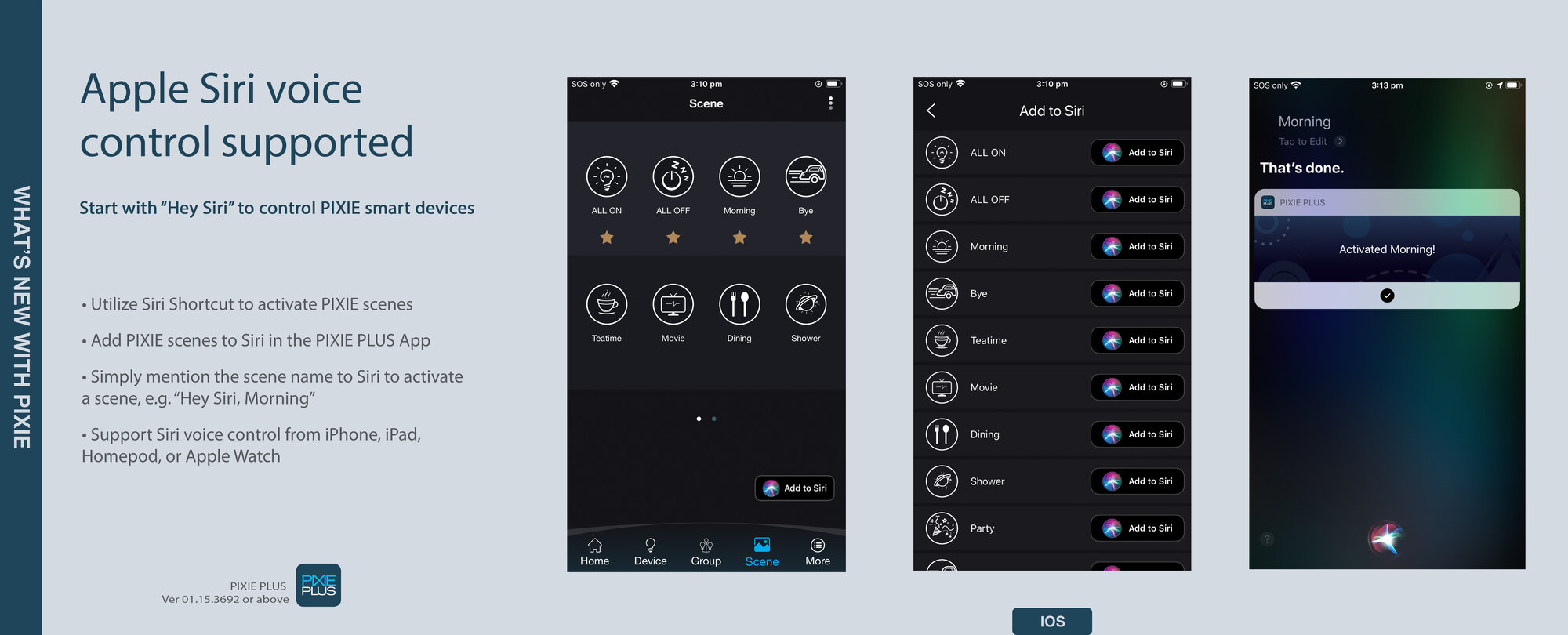
Will PIXIE PLUS operate with (SIRI type) voice assistant?
Will PIXIE or PIXIE PLUS operate with (SIRI type) voice assistant?
Yes, SAL PIXIE PLUS in association with a connected SAL PIXIE GATEWAY, supports Siri Voice Control.
To operate this function the user must first have;
(1) Compatible devices - iPhone or iPad (iOS 8.0 or later).
(2) The user device must include the PIXIE PLUS App version 01.12.3666 or above.
(3) PIXIE devices located in the HOME are set up with relevant SCENES and the PIXIE GATEWAY is connected to the HOME.
-
Will Pixie Plus operate with Apple Home Kits?
Will Pixie Plus operate with Apple Home Kits?
Sorry, Pixie Plus is not compatible with Apple Home Kits. Pixie Plus is compatible with Google Home and Alexa
-
Will PIXIE products operate with voice control devices a such as Google Home?
Will PIXIE products operate with voice control devices a such as Google Home?
Yes, PIXIE devices will communicate with common voice control devices such as Google Home, with the PIXIE Plus app available in Australia September 2019.
-
Will SAL PIXIE devices operate with a magnetic or leading edge load?
Will SAL PIXIE devices operate with a magnetic or leading edge load?
No, these devices are not compatible
-
Will SAL PIXIE devices operate without Bluetooth?
Will SAL PIXIE devices operate without Bluetooth?
Yes, SAL PIXIE Switch, Dimmers and LED strips operate with or without Bluetooth control.